SEGGER RTT without a J-Link
Category: Tutorial
SEGGER RTT sends log text on Cortex-M. The firmware uses SEGGER RTT instead of a UART.
The firmware links the SEGGER library. The library writes the log text into a buffer in RAM. A debug probe reads that buffer through SWD. The CPU continues to run.
The firmware does not use UART pins. You do not set a baud rate. The probe does not stop the CPU.
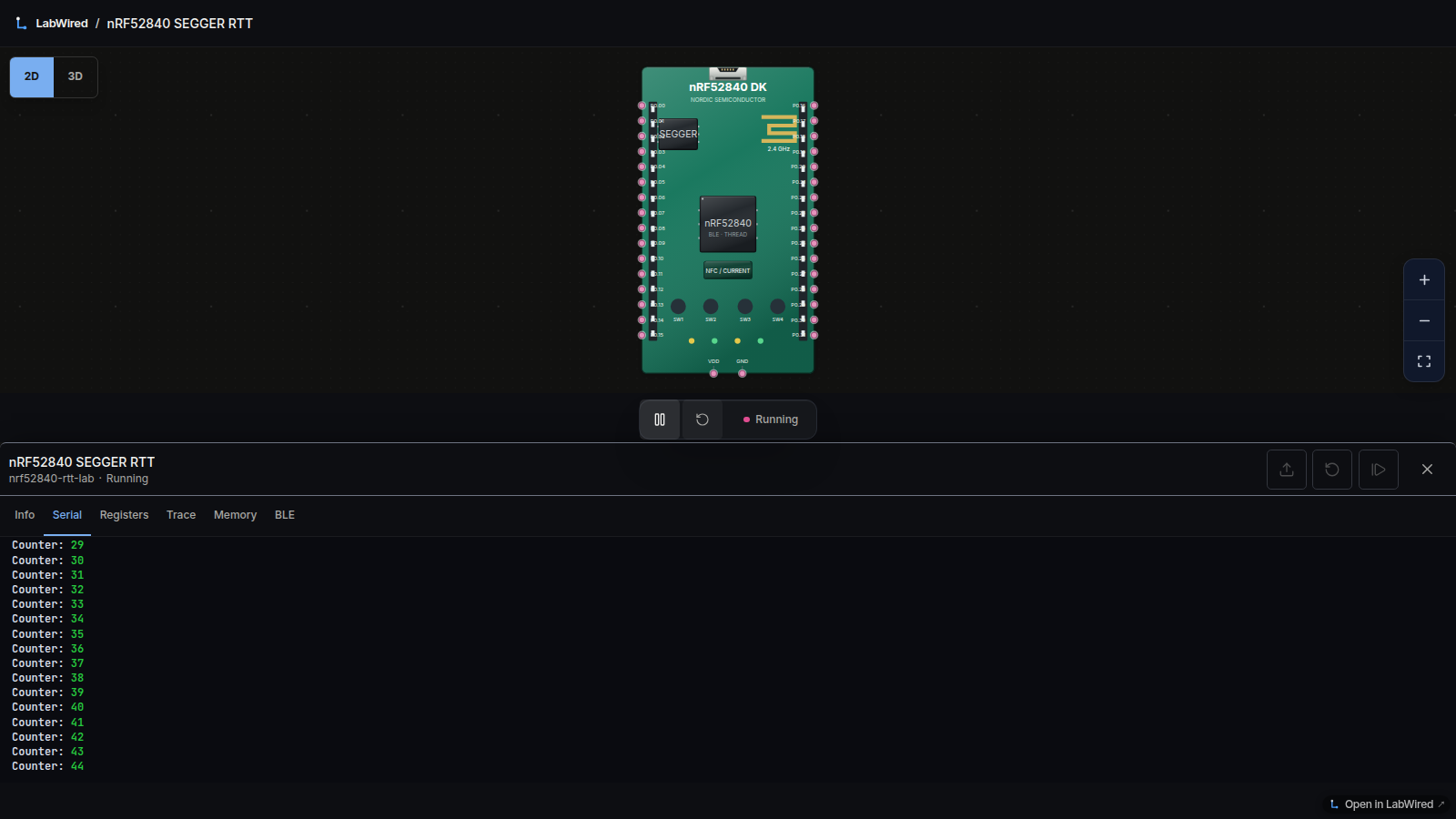
The SEGGER tutorial uses a J-Link and the RTT Viewer. This tutorial uses LabWired as the probe. LabWired reads the same control block in the simulator. You see the log text in the browser. The firmware uses the same SEGGER library. The data format is the same. You do not need a board.
The example
The SEGGER sample writes a hello line, a counter, and a red overflow line:
int main(void) {
  int Cnt = 0;

  SEGGER_RTT_Init();
  SEGGER_RTT_WriteString(0, "Hello World from SEGGER!\n");
  do {
    SEGGER_RTT_printf(0, "%sCounter: %s%d\n",
                      RTT_CTRL_TEXT_BRIGHT_WHITE,
                      RTT_CTRL_TEXT_BRIGHT_GREEN,
                      Cnt);
    if (Cnt > 100) {
      SEGGER_RTT_TerminalOut(1, RTT_CTRL_TEXT_BRIGHT_RED"Counter overflow!");
      Cnt = 0;
    }
    int Key = SEGGER_RTT_GetKey();
    if (Key >= 0) {
      SEGGER_RTT_printf(0, "Got key: %c\n", Key);
      if (Key == 'q') {
        SEGGER_RTT_WriteString(0, "quit\n");
        break;
      }
    }
    _Delay(100);
    Cnt++;
  } while (1);
}
In LabWired, the sample is nRF52840 firmware. The firmware links the original files SEGGER_RTT.c and SEGGER_RTT_printf.c. LabWired does not change those files. The full program is in crates/firmware-nrf52840-rtt-demo/src/main.rs. The Rust code does the same steps as the C code.
#[entry]
fn main() -> ! {
    unsafe {
        SEGGER_RTT_Init();
        SEGGER_RTT_WriteString(0, c"Hello World from SEGGER!\n".as_ptr());
    }
    let mut cnt: i32 = 0;
    loop {
        unsafe {
            SEGGER_RTT_printf(0, c"%sCounter: %s%d\n".as_ptr(),
                BRIGHT_WHITE.as_ptr(), BRIGHT_GREEN.as_ptr(), cnt);
            if cnt > 100 {
                SEGGER_RTT_TerminalOut(1, c"\x1B[1;31mCounter overflow!".as_ptr());
                cnt = 0;
            }
            let key = SEGGER_RTT_GetKey();
            if key >= 0 {
                SEGGER_RTT_printf(0, c"Got key: %c\n".as_ptr(), key);
                if key == i32::from(b'q') {
                    SEGGER_RTT_WriteString(0, c"quit\n".as_ptr());
                    loop { core::hint::spin_loop(); }
                }
            }
        }
        for _ in 0..50_000u32 { core::hint::spin_loop(); }
        cnt += 1;
    }
}
The RTT_CTRL_TEXT_* macros are C text. Rust cannot read C macros. The Rust code contains the same control characters.
Run the example in your browser
The frame starts when the page opens. This firmware does not write UART text. If the firmware links SEGGER RTT, the console name changes to RTT. If the firmware does not link SEGGER RTT, the console name stays Serial Monitor.
This 10 second clip shows both RTT channels in the browser.
The hello line shows one time. The counter value increases. When the count passes 100, the red line Counter overflow! shows in the Serial pane. LabWired shows the colors. LabWired does not show the color codes as text.
The line under the console is the input line. Press Enter to send the line. LabWired also sends a newline character. The sample reads that character with SEGGER_RTT_GetKey. The sample then writes Got key:. If you send q, the sample writes quit. The sample then stops the loop. The SEGGER sample does the same steps.
Run the example from the command line
You can run the same ELF from the command line. The command line shows the RTT text. Get the project from labwired-core.
Do these two steps one time:
- Add the Rust target
thumbv7em-none-eabi. - Install the ARM C compiler. On Debian or Ubuntu, install the package
gcc-arm-none-eabi. The compiler builds the SEGGER C files.
cargo build -p firmware-nrf52840-rtt-demo --release --target thumbv7em-none-eabi
cargo run -q -p labwired-cli -- \
  --firmware target/thumbv7em-none-eabi/release/firmware-nrf52840-rtt-demo \
  --system examples/nrf52840-rtt-lab/system.yaml --rtt --max-steps 500000
The command line shows the same bytes as the browser. The command line includes the color codes ESC[1;37m and ESC[1;32m. The example below does not show those codes.
Hello World from SEGGER!
Counter: 0
Counter: 1
Counter: 2
Counter: 3
Check the log with a test
The command labwired test reads RTT as a separate log. The test does not take RTT text from the standard output. The example includes this test script:
# LabWired - nRF52840 SEGGER RTT printf demo smoke
schema_version: "1.0"
inputs:
  firmware: "../../target/thumbv7em-none-eabi/release/firmware-nrf52840-rtt-demo"
  system: "./system.yaml"
limits:
  max_steps: 500000
assertions:
  - rtt_contains: "Hello World from SEGGER!"
  - rtt_contains: "Counter:"
  # The green color code is between "Counter: " and the digit.
  # Include that code in the check.
  # The check shows that the counter is higher than 0.
  - rtt_contains: "Counter: \u001B[1;32m1"
  - expected_stop_reason: max_steps
cargo run -q -p labwired-cli -- test \
  --script examples/nrf52840-rtt-lab/rtt-printf-smoke.yaml \
  --output-dir out/nrf52840-rtt-lab/rtt-printf-smoke
The file rtt.log stores the RTT text. If LabWired cannot read RTT, the check rtt_contains fails. The test does not pass when the RTT text is missing.
How LabWired reads the control block
The SEGGER library keeps a control block in RAM. The control block starts with the text "SEGGER RTT". The control block also contains the number of buffers. Each channel has one descriptor. A descriptor has a write position and a read position. The write position name is WrOff. The read position name is RdOff.
LabWired finds the control block with the ELF symbol _SEGGER_RTT. On each cycle, LabWired reads the bytes from RdOff to WrOff. LabWired then writes the new RdOff value. A J-Link does these same steps.
The RdOff write gives free space to the firmware. The firmware can continue a write that waits for free space. A real probe gives that free space in the same way.
The project contains these files:
crates/firmware-nrf52840-rtt-demo/— the sample firmwarethird_party/segger-rtt/— the original SEGGER files. The README gives the source and the sha256 value.examples/nrf52840-rtt-lab/— the system file and the test scripts
Limitations
LabWired writes your input line into one buffer. SEGGER_RTT_GetKey reads that buffer. SEGGER_RTT_Read reads that buffer. LabWired does not write the other host-to-target buffers. The control block uses the 32-bit Cortex-M layout. On ARM, LabWired connects RTT when the ELF has the symbol _SEGGER_RTT. LabWired does not connect RTT on Xtensa. LabWired does not connect RTT when the boot image has no ELF. On those targets, the check rtt_contains fails. The bytes in the log come from the SEGGER library.