MCU board
PIC24F08KA102 bare chip (28-pin SPDIP)
The PIC24F08KA102 bare chip (28-pin SPDIP) is an MCU board in the LabWired part catalog. Its catalog type is pic24f08ka102. The catalog gives a supply range of 1.8–3.6 V. It has 26 pins. Silicon coverage for this board is tracked in the chip × peripheral validation matrix, not per-part.
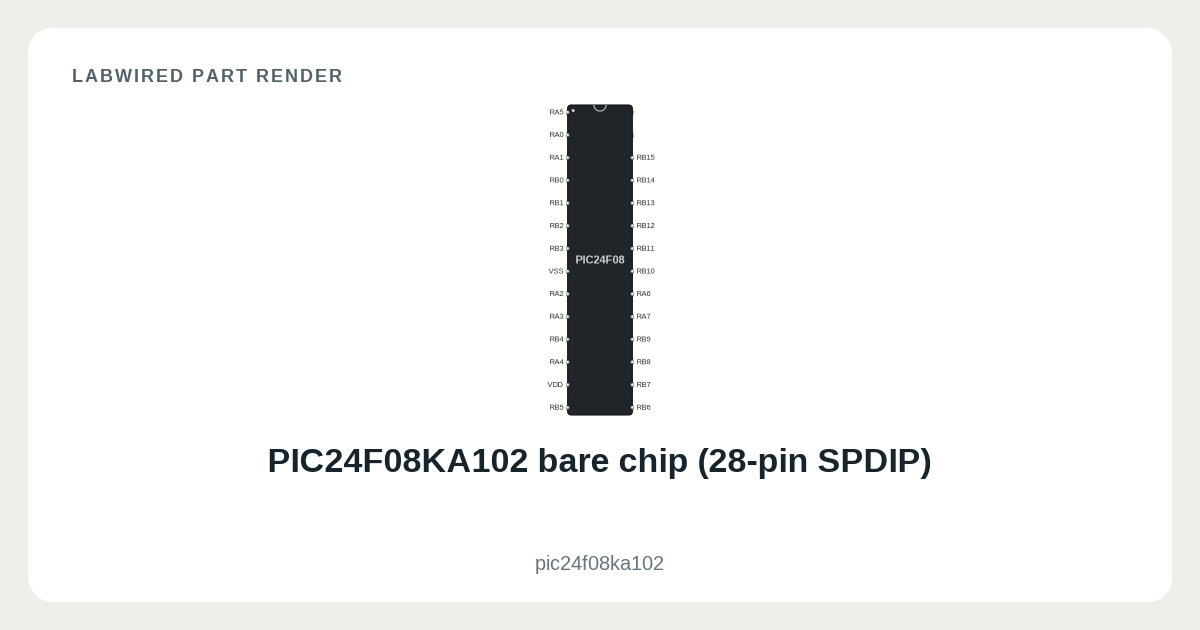
Key facts
| Category | MCU boards |
|---|---|
| Catalog type | pic24f08ka102 |
| Supply range | 1.8–3.6 V |
| Pins | 26 |
| Datasheet | PIC24F16KA102 Family Data Sheet (DS39927C) |
What LabWired simulates
What is simulated
MCU board
How it was validated
Not applicable
PIC24F08KA102 bare chip (28-pin SPDIP) pinout
- Power: VSS, VDD
- Other signals: RA0, RA1, RA2, RA3, RA4, RA5, RA6, RA7, RB0, RB1, RB2, RB3, RB4, RB5, RB6, RB7, RB8, RB9, RB10, RB11, RB12, RB13, RB14, RB15
| Pin | Electrical type | Function |
|---|---|---|
RA0 | Bidirectional | — |
RA1 | Bidirectional | — |
RA2 | Bidirectional | — |
RA3 | Bidirectional | — |
RA4 | Bidirectional | — |
RA5 | Bidirectional | — |
RA6 | Bidirectional | — |
RA7 | Bidirectional | — |
RB0 | Bidirectional | — |
RB1 | Bidirectional | — |
RB2 | Bidirectional | — |
RB3 | Bidirectional | — |
RB4 | Bidirectional | — |
RB5 | Bidirectional | — |
RB6 | Bidirectional | — |
RB7 | Bidirectional | — |
RB8 | Bidirectional | — |
RB9 | Bidirectional | — |
RB10 | Bidirectional | — |
RB11 | Bidirectional | — |
RB12 | Bidirectional | — |
RB13 | Bidirectional | — |
RB14 | Bidirectional | — |
RB15 | Bidirectional | — |
VSS | Power input | Supply |
VDD | Power input | Supply |
How to simulate the PIC24F08KA102 bare chip (28-pin SPDIP) in LabWired
- Open the Playground at app.labwired.com and select the PIC24F08KA102 bare chip (28-pin SPDIP) as the board.
- Write the firmware, then build it and run it.
- Add parts from the catalog and connect them to the board pins. The categories below list the parts by bus.
- Before you trust a result, look at the validation matrix. It shows which chip peripherals are modelled and how each one was checked.
Parts to connect to the PIC24F08KA102 bare chip (28-pin SPDIP)
- I²C devices (43)
- SPI devices (23)
- UART devices (8)
- Board I/O modules (57)
- Logic ICs (8)
- Passive, analog and power parts (48)
- Wireless (1)
Related MCU boards
Modelled from PIC24F16KA102 Family Data Sheet (DS39927C).